
CBM3 is online cargo loading software for planning cartons, cases and loaded pallets in shipping containers and trucks. Enter your actual order, choose equipment and handling rules, then review the 3D arrangement and any unplaced cargo before operational checks. Open the container loading calculator to start, or use the separate CBM volume calculator for a volume-only question.
Evaluate the workflow: see the checked 55-item example, view its example loading report (PDF), or check free access and account requirements. The same shipment was rerun on the live cbm3.net calculator, version 11.63.94, on 4 November 2026. The linked PDF is the unedited live export; the historical screenshot below retains its original date and version.

What does load-planning software do?
It tests how entered transport units can be arranged in a defined load space under the rules you supply. Unlike a CBM total, a placement model considers individual dimensions and permitted orientations. Its value is making assumptions, unplaced cargo and alternative arrangements visible before operational review.
| Your question | Useful workflow | What not to infer |
|---|---|---|
| What is the shipment volume? | Calculate CBM from packed dimensions and quantities | A volume total is not proof of physical fit |
| Will this order fit? | Test the entered carton order with actual quantities, equipment and handling rules | The result is not an unlimited-order capacity search |
| Should cartons go on pallets? | Build pallets from cartons, then plan already loaded pallets using their complete outside dimensions and gross weight | Already loaded pallets must not receive another pallet allowance |
| How should the team review the order? | Review placed/unplaced counts and sequence in the step-by-step planning workflow, then export the selected-result PDF | A report is not a cargo-securing or transport-safety certificate |
What the planning workflow includes
- Packed cargo dimensions, quantity and weight per item.
- Horizontal-only rotation by default, with explicit Full 3D permission where turning is allowed.
- Row-level handling and stacking rules, plus plan-wide loading preferences.
- Pallet configuration and a simulation that distinguishes palletized and floor-loaded cargo.
- Placed and unplaced quantities, alternative methods and an estimated center-of-gravity indicator.
- CSV/XLSX cargo transfer and a PDF planning report.
Freight forwarders, exporters and warehouse teams can use the same input checklist, but each must supply the real restrictions for its goods and equipment. A more attractive rendering cannot compensate for missing or incorrect measurements.
A checked mixed-shipment example
This synthetic order uses the 20DC planning profile, stackable boxes, Horizontal Only, and no added pallets or global rules. It tests a defined order rather than promising a generic container capacity.
| Group | Width x length x height (cm) | Quantity | kg per item |
|---|---|---|---|
| Cartons | 60 x 80 x 40 | 45 | 20 |
| Cases | 100 x 120 x 100 | 10 | 125 |
The order contains 55 items, 20.640 m3 and 2,150 kg. In the live CBM3 11.63.94 check on 4 November 2026, Max Volume and Best Balance each placed 55 items in one 20DC, with zero unplaced. The PDF records Max Volume. The methods need not produce identical coordinates. These are entered-order results, not a mathematical maximum or a physical loading trial.
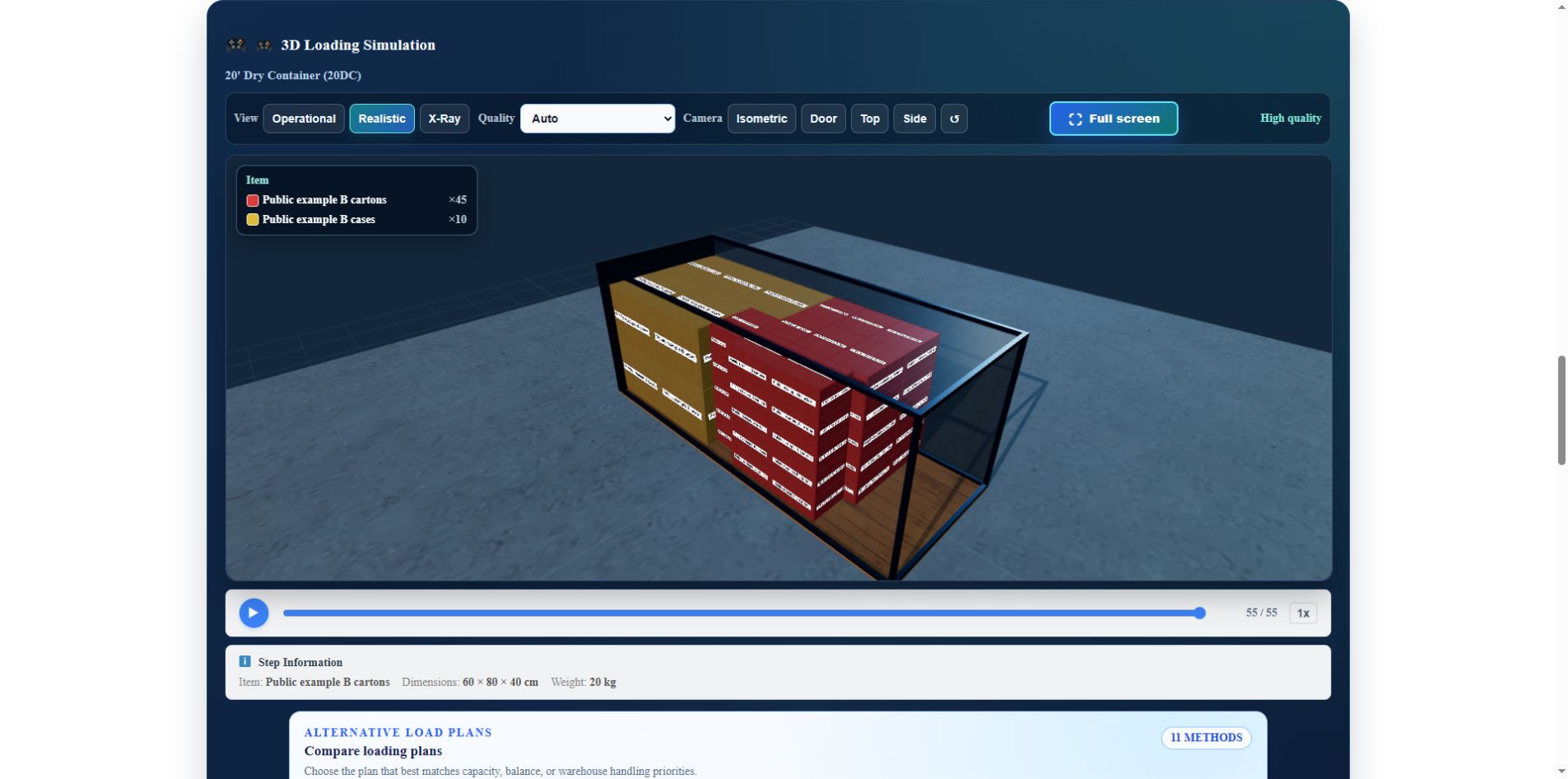
Follow the step-by-step planning guide for the complete settings. The five-page example loading report (PDF) was exported directly from cbm3.net on 4 November 2026 and records the selected Max Volume result and its limitations. This is a synthetic example, not a customer document or a safety approval. Missing additional-material, actual-equipment and transport records remain explicitly unassessed.
Containers, trucks and pallets: choose a supported profile
At the 11 October 2026 availability review, 35 predefined load spaces plus Custom Size were selectable. The underlying catalog contains 36 predefined records: AKH remains unavailable pending its separate evidence review. A catalog entry is not a promise that an equipment profile is enabled or approved for transport.
For standard shipping containers, start with the 20ft / 20DC loading calculator, 40ft / 40DC loading calculator or 40ft High Cube / 40HC loading calculator. Each guide opens the same planner with the relevant equipment preset; it does not start a calculation automatically.
Road, rail and air-cargo records do not all have the same geometry, specification confidence or operational support. Read each profile’s warnings and confirm the actual equipment. The equipment list is not an aircraft-loading, rail-operation or cargo-securing approval.
The loading-space guide directory covers published equipment guides. The count of published guides is not the count of selectable profiles. A custom envelope also does not establish doorway clearance or a vehicle’s structural rating.
Choose a placement method for the problem
The initial non-palletized plan compares Max Volume and Best Balance. Palletized mode retains its single pallet-plan workflow. Other methods are selected explicitly when applicable:
- Max Volume
- Best Balance
- Deeper Search
- PRO Optimization
- Easy Loading
- Stability First
- Route First
- Max Volume v2
- Layer Build
- Sequence Feasible
- Axle-Aware
Strategies emphasize different priorities. Compare them with the same quantities and constraints. Deeper Search and PRO are not automatic promises of a better arrangement. PRO requires confirmation and has its own model. Axle-related checks need suitable sourced vehicle data; an estimated weight center is not an axle measurement.
Search time is a budget, not an optimum guarantee
In the reviewed 11.63.56 code, ordinary Max Volume and Best Balance searches have six-second budgets each. Other search paths differ. Max Volume v2 has an eight-second budget up to 1,000 items and fifteen seconds above that threshold. Layer Build and Sequence Feasible have ten-second budgets.
These limits apply to eligible jobs. A method may be unavailable for a particular profile or input size, and a search can finish early. Setup, validation and rendering add elapsed time. A budget is neither a fixed wait nor a guarantee of the globally best arrangement.
Distinguish loose cargo from loaded pallets
Building pallets from cartons is different from loading complete pallets into a container. A loaded unit needs its outside footprint including overhang, total height including the base, and gross weight including tare. Count the base and tare once, keep it upright and leave stacking disabled unless expressly suitable.
The loaded-pallet transfer workflow preserves full and partial units separately and asks before replacing existing cargo. The container plan represents each complete unit by its outside envelope; it does not re-optimize every carton inside that pallet.
Excel input, PDF output and project sharing
The Excel and CSV template guide explains the cargo-input format. CSV and XLSX carry cargo inputs and supported rules into or out of CBM3. They are not an Excel-based copy of the 3D optimization engine. Check column names, units, quantities and rotation after an import rather than relying only on a successful upload message.
A PDF documents a completed selected result. Export again if the cargo or rules change. The example report distinguishes the 2,150 kg cargo subtotal from unassessed total transport mass; missing additional-material or equipment data is not assumed to be zero.
A public link contains shipment inputs in its URL. Share it only with intended recipients; do not treat it as a private or immutable placement record. Reopening can recalculate under another product version. Check result-change warnings and reconfirm an on-demand method where required.
Free online planning and account requirements
The planner runs in your browser; it is not a desktop program that you install. The core workflow accepts multiple cargo rows for a mixed order. Keep each row’s real orientation, stacking and weight limits instead of assuming all goods can be turned or stacked.
In CBM3’s free mode, basic calculations, 3D planning, file import and PDF export do not require registration. Cloud project saves and the account dashboard require a signed-in owner. Technical quantity, file-size and resource limits still apply; free access does not mean unlimited-size computation.
Local History and Templates belong to the current browser, not a cross-device cloud backup. Keep reviewed inputs and reports with the operational handoff.
Keep the planning limits visible
A geometrically valid placement is not a complete cargo-securing design. A simulation does not measure friction, certify lashing capacity, inspect an actual container, validate a CSC plate or issue VGM. Support rules and PRO’s static model cover parts of the simulation, not every journey-specific safety check.
The IMO/ILO/UNECE CTU Code is non-mandatory guidance for packing and securing. The responsible transport parties must review the actual load and applicable requirements. A filled-in record or a software score is not independent certification.
Common software-selection questions
Is a CBM calculator the same as a load planner?
No. A CBM calculator adds volumes. A load planner considers where individual units can be placed under the entered constraints. Use the simpler tool for a volume-only question and the 3D workflow for an actual order-fit question.
Can I use one universal pallet or box capacity?
No. Packaging size, overhang, stacking permission, weight and equipment change the answer. The example above does not establish the maximum number of cartons or pallets for all 20ft containers.
Will more search time always improve the plan?
No. More search may explore additional candidates, but it may find no better valid arrangement. Do not loosen real cargo restrictions to obtain a higher displayed utilization.
Start with a repeatable workflow
Prepare the beginner checklist, follow the step-by-step container planning guide, and keep inputs and result together. Review every unplaced item, orientation, pallet assignment and equipment warning before loading.
References: CBM3 11.63.56 source and product availability reviewed on 11 October 2026; the historical CBM3 11.63.53 screenshot from 6 October 2026; the same synthetic shipment rerun in live CBM3 11.63.94 and exported as a PDF on 4 November 2026; IMO/ILO/UNECE, CTU Code. The historical screenshot retains its original version and date; the linked PDF is the new live export. The new check covers this example, not a re-audit of every product capability.