
20ft (20DC) Container Loading Calculator
Plan a 20ft dry container, also called 20DC or 20GP, using your packed dimensions, quantities and weights. Compare floor-loaded cartons or complete loaded pallets without treating CBM alone as proof of fit.
Test the quantity you enter and review placed and unplaced cargo. This is a planning estimate, not a maximum-capacity guarantee or transport approval.
A 20ft dry container has roughly 33 cubic metres of internal space, but cargo volume alone cannot tell you how many boxes will fit. Use this guide and the 20DC loading planner to test your actual quantities, packed dimensions, weights and handling rules, then inspect the placement in 3D.
Quick answer: CBM3’s 20DC planning profile is 589 cm long, 235 cm wide and 239 cm high, giving 33.081 m3 of internal volume. Its entered cargo payload limit is 28,200 kg. These are software defaults, not the guaranteed measurements or permitted load of your assigned container.
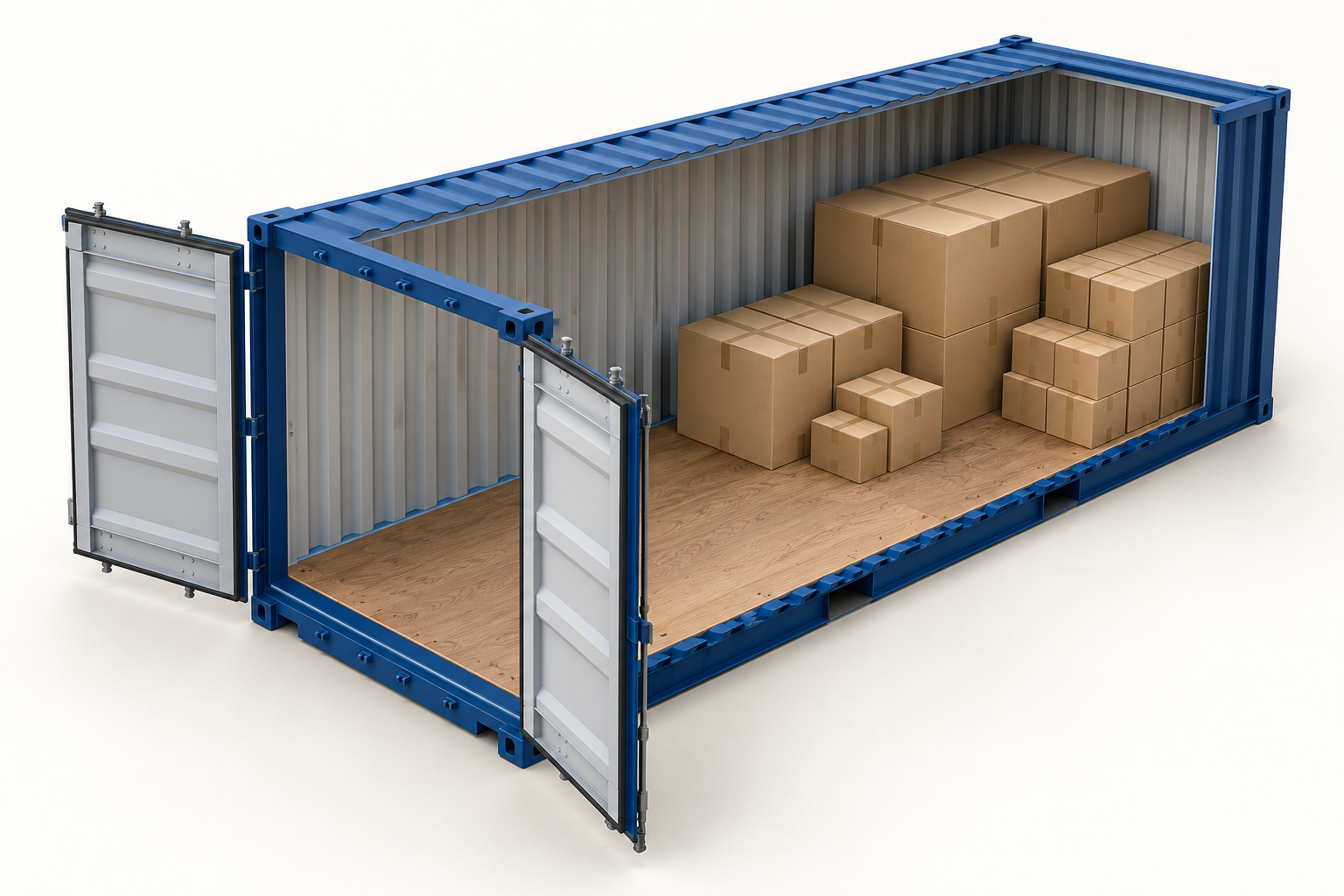
What does 20DC mean?
In CBM3, 20DC is the standard 20ft dry-container profile. If a booking uses another abbreviation, such as 20GP, confirm the actual equipment specification rather than relying on the label alone. The nominal 20ft name is not the usable interior length. Do not use this profile for a refrigerated, open-top or high-cube container without checking the appropriate equipment.
20ft container dimensions, door opening and weight limits
Keep three checks separate: the space inside, the clear opening through which cargo must pass, and the permitted weight. The carrier example below is a reference, not a replacement for CBM3’s profile or a specification for every container.
| Measurement | CBM3 20DC planning profile | Hapag-Lloyd fleet example |
|---|---|---|
| Inside length | 589 cm | 590.0 cm |
| Inside width | 235 cm | 235.2 cm |
| Inside height | 239 cm | 239.5 cm |
| Door width x height | No verified opening supplied by this preset | 234.0 x 229.2 cm |
| Cargo payload | 28,200 kg planning limit | 28,130 kg |
| Internal volume | 33.081 m3, calculated from the profile | 33.2 m3, published capacity |
Reference: Hapag-Lloyd, 20′ Standard, fleet specification checked on 6 October 2026. The carrier notes manufacturer variation. Obtain the assigned unit’s measurements and ratings before loading. An item that fits the interior may not pass through its door.
For imperial inputs, select the calculator’s Imperial unit system and enter inches and pounds. Do not paste inch values into fields labelled centimetres. Keep the weight per item separate from the row’s total weight.
How many CBM fit in a 20ft container?
The CBM3 profile provides 33.081 m3 of geometric interior volume. Calculate a rectangular cargo row as length x width x height x quantity / 1,000,000 when dimensions are in centimetres. Add the rows to obtain your shipment’s cargo CBM.
For example, ten cartons measuring 40 x 60 x 80 cm occupy 1.920 m3. That is about 5.8% of this profile’s volume. The percentage is a volume comparison, not proof that a particular arrangement, door passage or handling method works.
There is no fixed usable-CBM allowance that works for every order. Long packages, non-stackable cargo, gaps between sizes, pallets and weight limits can leave space unused. Do not apply a universal fill percentage or divide container CBM by carton CBM and treat the rounded answer as a loading plan.
How many boxes fit? Test the order you intend to ship
CBM3 tests the quantities you enter. It does not turn an empty quantity field into a proven maximum-capacity search. Enter one row for identical cartons or several rows for a mixed shipment, and calculate them together. A small carton may occupy a gap left by a larger case, so separate calculations do not describe the combined order.
- Select the equipment. Open the planner with the 20DC starting selection and confirm the current Load Space before running it.
- Measure the packed outside envelope. Include packaging and protrusions. Enter width, length, height, quantity and weight per unit for every row.
- Set real handling permissions. Keep Horizontal Only unless another orientation is permitted. Full 3D Rotation is an explicit packaging decision, not a shortcut for making cargo fit. Review stackability, This Side Up, Fragile and any stack-weight limit.
- Run Plan 3D Cargo Loading. Inspect the available results. To reproduce the examples below, select Max Volume under Alternative load plans.
- Read the complete result. Compare entered, placed and unplaced quantities and inspect each container. Confirm that nothing remains unplaced and that the selected equipment count matches the shipment you intend to book.
A completed calculation is not the same as all cargo fitting in one container. A result using two containers may place every entered item without meeting a one-container requirement. Search methods explore candidate arrangements; the displayed count is not a guaranteed mathematical minimum.
Two checked 20ft container loading examples
These synthetic orders demonstrate the workflow, not maximum container capacity. Both use stackable boxes, Horizontal Only, no palletizing, normal priority, no delivery stops and no additional global loading rules. This Side Up and Fragile are unchecked and maximum stack weight is empty for these test orders only. Use the actual restrictions for your goods.
| Order and row | Width x length x height | Quantity | Weight per unit |
|---|---|---|---|
| A: rectangular cartons | 40 x 60 x 80 cm | 10 | 25 kg |
| B: cartons | 60 x 80 x 40 cm | 45 | 20 kg |
| B: cases | 100 x 120 x 100 cm | 10 | 125 kg |
Order A: 10 entered, 10 placed, 0 unplaced in one 20DC. Cargo volume is 1.920 m3 and entered cargo weight is 250 kg.
Order B: 55 entered, 55 placed, 0 unplaced in one 20DC. Cargo volume is 20.640 m3 and entered cargo weight is 2,150 kg. The two rows are one mixed order. Its volume utilization is about 62.4%, not a claim that the remaining space can accept any additional item.
Checked on 6 October 2026 using CBM3 11.63.53 and Max Volume. Engine verification included independent quantity, orientation, support, boundary, collision and entered-payload checks. Order A was also run in Chrome and Edge; Order B was run in Chrome and its five-page PDF was visually inspected. These are software tests, not a physical loading trial or transport approval.
How many pallets fit in a 20ft container?
The pallet name alone is not enough to give a reliable count. The loaded outside width and length, total height, gross weight, overhang and permitted stacking all matter. A floor-position count is not automatically a double-stacked pallet capacity.
- Loose boxes to be palletized: enter carton dimensions and choose the palletizing workflow. Review the selected pallet and stack-height limit.
- Already loaded pallets: treat each pallet and its cargo as one transport unit. Include the pallet base in total height and pallet tare in gross weight once, not twice. Do not palletize that complete unit again.
- Orientation and stacking: keep loaded pallets upright. Permit only horizontal turns and leave pallet stacking disabled unless the actual load, pallet and handling process permit it.
The carton-only examples above do not establish a pallet count. Measure your loaded units and review the resulting plan, door access and handling requirements instead of treating a generic pallet-count chart as shipment approval.
Payload, cargo weight and VGM are different checks
CBM3 compares entered cargo weights with the selected planning limit. Unknown or omitted weights cannot establish that your shipment meets its actual limits. Use the assigned container’s rating and verify the complete route and handling constraints with the responsible parties; a software preset is not permission to carry that weight.
A cargo subtotal is not the packed container’s verified gross mass (VGM). IMO’s VGM guidance describes the shipper’s separate responsibility before vessel loading and the need to account for container tare, pallets, packing and securing materials in the applicable verification process. See the named reference below.
20ft or 40ft: compare the same shipment
Start with the same cargo dimensions, quantities, weights and handling rules, change the equipment and run a new plan. Compare container count, placed and unplaced quantities, payload and practical loading access, not utilization percentage alone. A larger container is not automatically the better commercial choice; obtain freight and handling quotations separately.
Use the loading-space guides to review other equipment profiles. Dry, high-cube, refrigerated and special equipment should not share assumed dimensions or restrictions.
Common 20ft loading questions
Why does an order below 33 CBM still need another container?
Volume does not describe shape or allowed placement. Check long or tall items, orientation restrictions, non-stackable rows, unusable gaps and weight. Review the unplaced-item information and every container rather than changing handling rules merely to improve utilization.
Can I turn every carton on its side to fit more?
Only if the actual product and packaging allow it. Horizontal Only preserves height; Full 3D Rotation allows additional orientations subject to other constraints. Keep upright-only cargo and loaded pallets upright.
Does the 3D result prove the cargo will pass through the door?
No. This 20DC preset does not supply a verified door opening, and an interior arrangement alone is not a verified loading path. Obtain the actual clear opening and check the handling route before loading.
Is the illustrated load a safety-approved arrangement?
No. The AI illustration is explanatory, and the calculated examples are software tests. Neither certifies packaging strength, lashing or transport safety. The non-mandatory IMO/ILO/UNECE CTU Code addresses broader packing and securing practice beyond a geometric placement result.
References and verification
- Hapag-Lloyd: 20′ Standard, carrier fleet dimensions, door opening and weight specification. Checked 6 October 2026.
- IMO, ILO and UNECE: Code of Practice for Packing of Cargo Transport Units (CTU Code), 2014; IMO overview checked 6 October 2026.
- International Maritime Organization: Verification of the gross mass of a packed container, checked 6 October 2026.
- CBM3: version 11.63.53 product profile, reproducible example inputs, browser checks and PDF review, 6 October 2026.
Open the 20DC loading planner and test your own order with its real handling restrictions.
Software compatibility note, 8 October 2026 (Europe/Istanbul): The planning profiles and recorded example inputs were checked against the source-reviewed CBM3 11.63.56 candidate. The earlier example execution dates remain unchanged; this compatibility review is not a new optimization run or physical-loading test. Fleet-provider and carrier references are not manufacturer approval. Confirm the actual unit dimensions, payload and securing requirements.
How to inspect and hand over a loading plan
Use the selected plan and the complete shipment data. Recheck the result after changing cargo, equipment or handling rules.
See every cargo unit in context
Search the cargo inventory, focus on an item and switch between realistic, operational, top and side views. Inspect pallet layers and height sections.
The inventory separates requested units, units in the selected container, units in other containers and unplaced units. Select a row to find its cargo in the scene; playback and height sections show only part of the complete plan.
Use pallet details to inspect full, partial and mixed pallets. A height section filters the view; it does not remove cargo from the plan. Vehicle bodies and wheels provide visual context.
Prepare clearer warehouse instructions
Use product colors and short codes, named groups and delivery stops. Choose a summary or warehouse PDF for the selected plan.
Assign product colors and short codes to connect the cargo table, 3D view and reports. Group and stop names improve instructions; apply the appropriate loading rules when a sequence must be enforced.
Compare verified alternatives and review any manual moves. A manual reallocation affects the current preview and PDF; saved or shared inputs recalculate the automatic arrangement when reopened. Export again after changes.
Read the estimated center of gravity
Review longitudinal, lateral and height coordinates from known cargo and pallet masses. Check the displayed origin and units before comparing plans.
The estimate assumes each item's mass is centered and excludes vehicle tare. Missing or stale additional-material records can leave the complete-load assessment unavailable; explicitly declare none when no extra materials are present.
Coordinates use the load-space frame, not road height. For Step Deck, X starts at the raised front end and Y at the lower-deck datum; axle-form distances run from the rear toward the cab.
Distinguish the loading unit from its carrying vehicle
This loading unit alone does not define an axle configuration.
Inspect cargo and pallet weight distribution in this loading space. A container, swap body or air-cargo unit does not identify the road chassis, rail wagon or aircraft carrying it.
Axle estimates are available after selecting a supported complete road or rail vehicle. Enter its actual mounting positions, full empty reactions and applicable limits; do not reuse a trailer reference as container or aircraft approval.