
48ft Step Deck Trailer Loading Calculator
Use the step-deck profile and inspect the deck split before loading. Confirm actual upper and lower deck dimensions and the permitted road height.
Test the quantity you enter and review placed and unplaced cargo. This is a planning estimate, not a maximum-capacity guarantee or transport approval.
Quick answer: The CBM3 48 ft step-deck profile has two support levels, not a single rectangular floor. Its overall planning footprint is 1463.04 x 259.08 cm, or 48 ft x 102 in. You must enter upper-deck length, deck drop and a cargo-height envelope. The tested setup below placed 24 loaded pallets, split 4 on the upper deck and 20 on the lower deck; a separate tall crate fitted only on the lower deck. Payload remains unverified.
Open the 48 ft step deck planner, confirm the selected equipment and complete its required profile fields. This link only provides an initial selection; it does not fill the example settings or calculate automatically. Saved jobs and your own later choices take priority.
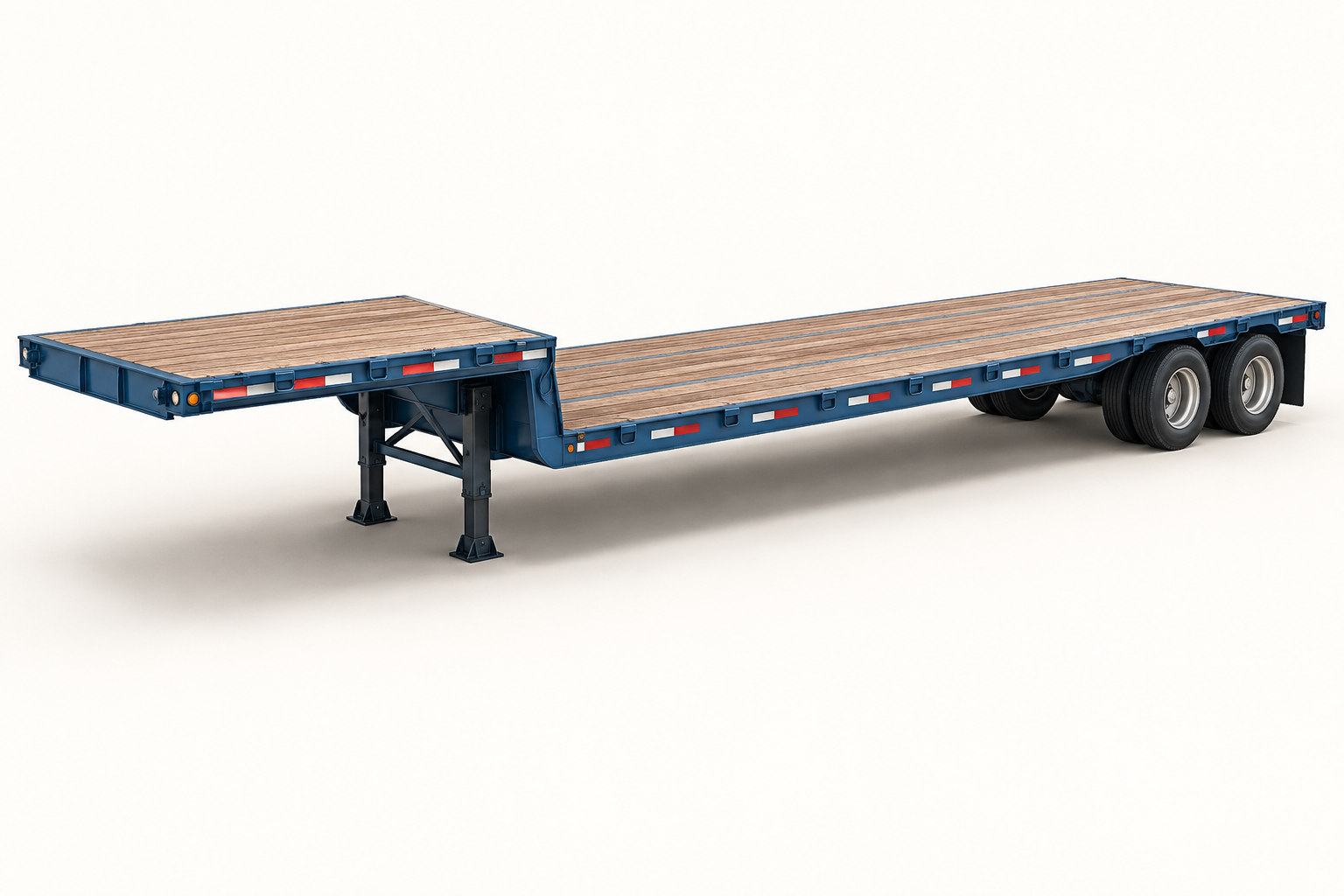
48 ft step deck dimensions and deck area
| Field | Current preset |
|---|---|
| Planning footprint | 1,463.04 x 259.08 cm = 48 ft x 102 in |
| Plan-view deck area | 37.904 m2 = 408 sq ft |
| Default cargo-height envelope | Not set; user input required |
| Preset cargo limit / gross / tare | Unverified; not a payload pass |
| Floor model | Two support regions; configured deck break |
| Automatic Best Fit equipment search | Not included; select and configure this profile |
These are software reference dimensions, not a measurement of every trailer sold as 48 ft. The plan-view area is length x width; it does not account for every fitting, usable edge clearance or physical obstruction. Confirm the assigned unit and load access before using the result.
Set the height and deck geometry before calculating
The cargo-height envelope uses the lower-deck plane as zero. The raised front deck consumes part of that envelope: with a 300 cm envelope and a 60 cm deck drop, only 240 cm remains above the upper deck. This is a model coordinate, not an above-road measurement or legal cargo-height allowance. Measure the actual trailer and establish the applicable clearance separately.
| Setting | Test value | Meaning |
|---|---|---|
| Cargo-height envelope | 300 cm | Measured from lower-deck plane, not road |
| Upper-deck length | 300 cm | Synthetic example; replace with actual measurement |
| Deck drop | 60 cm | Upper floor is 60 cm above lower floor |
| Lower-deck length | 1163.04 cm | 1463.04 – 300; derived from the example |
| Height above upper deck | 240 cm | 300 – 60; not 300 cm |
| Cargo-weight limit | Blank / unknown | Do not enter structural rating as payload |
| Configured model volume | 109.050 m3 | Depends on these inputs; not fixed physical capacity |
Without the height envelope, upper-deck length and deck drop, the current profile is incomplete and the planner cannot build its effective load space. Do not replace missing data with a sea-container height or assume an open deck has unlimited height.
How many pallets fit on this trailer?
There is no fixed upper/lower pallet count in the preset: the split depends on the deck geometry and loaded footprints you enter. With the exact setup below, both methods placed 4 pallets on the raised front deck and 20 on the lower deck. The pallet height is 200 cm in this step-deck test, so do not compare it as identical input to the flatbed guide’s 150 cm example.
Keep loaded pallets upright and enter the full loaded dimensions, including the base and any overhang. Allowing horizontal turns is not permission to overturn a pallet. The number entered, orientation, stacking permission, height envelope and real weight limits all matter.
Reproduce two entered-order examples
Run A and B separately in metric units, using the settings above. Turn palletization off: A already includes its pallet base, and B is an outer transport-crate envelope. Include pallet or skid height and tare once. Use Horizontal Only, This Side Up on, Stackable off, Fragile off, no extra stack-weight limit, Normal priority and no delivery stop. Leave other constraints at defaults.
| Order | Cargo | Width x length x height cm | Entered units | Gross kg per unit | Input m3 |
|---|---|---|---|---|---|
| A | Loaded 48 x 40 inch pallet | 101.6 x 121.92 x 200 | 24 | 500 | 59.458 |
| B | Tall lower-deck crate | 200 x 1000 x 280 | 1 | 5000 | 56.000 |
| Order | Method | Entered | Placed | Unplaced | Trailers | Placed m3 | Placed kg | Upper / lower units | Payload check |
|---|---|---|---|---|---|---|---|---|---|
| A | Max Volume | 24 | 24 | 0 | 1 | 59.458 | 12,000 | 4 / 20 | Unknown |
| A | Best Balance | 24 | 24 | 0 | 1 | 59.458 | 12,000 | 4 / 20 | Unknown |
| B | Max Volume | 1 | 1 | 0 | 1 | 56.000 | 5,000 | 0 / 1 | Unknown |
| B | Best Balance | 1 | 1 | 0 | 1 | 56.000 | 5,000 | 0 / 1 | Unknown |
The two automatic methods ran on 6 October 2026 through the installed 11.63.53 Worker with the actual configured-equipment helpers. Independent checks covered counts, identity, overlap, bounds, upright orientation and direct support on the correct deck. These are not browser, physical loading, axle-load, route or securing acceptance tests. Both examples have an unknown payload assessment, even when every item is geometrically placed.
Why the model does not bridge the deck break
With a 300 cm upper deck, the remaining lower deck is 1163.04 cm long. Both methods rejected a 200 x 1300 x 100 cm beam envelope even though 1300 cm is shorter than the overall 1463.04 cm trailer. It cannot stay within either support region. The 200 x 1000 x 280 cm example crate did fit on the lower deck, but it exceeds the 240 cm space above the raised deck. The planner does not invent a ramp, load leveller or engineered bridge.
Items that cannot fit remain unplaced; they are not made safe by the 3D display. Additional height, special bridging equipment or an over-dimension arrangement needs its actual engineering and operational assessment, not a more permissive software setting.
Weight capacity is not the same as a structural rating
Great Dane’s Freedom Steel information distinguishes distributed and concentrated structural load ratings and qualifies them by configuration. The current page mentions 80,000 lb distributed and 50,000 lb concentrated over a 4 ft span for specified stock configurations. Those figures are not automatically the allowed cargo weight of a truck-and-trailer combination.
Neither CBM3 preset supplies a verified payload, gross mass or tare. Obtain the actual equipment and vehicle limits; do not convert a brochure rating into an assumed legal payload. The estimated cargo centre of gravity is a planning aid, not axle certification, a floor-strength check or a validated tie-down design.
Flatbed versus step deck: compare the load, not just CBM
A lower main deck can offer a taller model envelope over that region, but its length is shorter than the overall trailer. A flatbed has one uninterrupted support plane instead. Re-enter the same actual load and rules when comparing them; more reference volume does not prove better fit, vehicle compatibility or a minimum-trailer result.
See the 48 ft flatbed loading guide for the other profile. Do not treat an open flatbed, single-drop step deck, double-drop lowboy and flat-rack container as interchangeable. This planner does not infer the correct truck, route or securing equipment from a cargo name.
From dimensions to a reviewed plan
- Select the actual equipment profile and enter the required measured configuration.
- Enter every cargo group with its actual outer dimensions, quantity, gross weight and handling permissions.
- Press Plan 3D Cargo Loading; compare Max Volume and Best Balance and inspect all allocated trailers and unplaced items.
- Check missing weight data, deck support and clearances before arranging loading or transport. Do not read a complete geometric placement as a release approval.
- Use the available save and export controls for your account or plan. Unlimited anonymous access and an instant or mathematically optimal result are not promised.
The step-by-step planning guide covers the general interface. Keep genuine constraints unchanged when comparing methods.
Questions about 48 ft step deck planning
Is an 11 ft upper deck and 37 ft lower deck already configured?
No. This profile requires the real upper-deck length. The examples deliberately use a stated 300 cm front deck rather than silently assuming a common split.
Is a step deck the same as a double-drop lowboy?
Not in this model. The preset and illustration have one raised front deck and one long lower deck. A separate rear raised deck or a low well needs its actual geometry, not this two-level approximation.
Can I treat the entire trailer as one flat floor?
No. Doing so discards the raised deck, its smaller vertical allowance and the no-bridging constraint. Keep the measured support regions in the plan, including for already-loaded pallets.
References and verification
Named references: Great Dane Freedom Steel product information; Great Dane Freedom Open Deck brochure, DMD 0720, customization options; and CBM3 11.63.53 catalog and recorded engine tests. The brochure describes 20-26 inch deck-drop options; it does not prescribe the 300 cm upper-deck example used here. Source and product checks were completed on 6 October 2026. Values from a particular manufacturer configuration are not universal specifications.
This guide is a preliminary planning aid, not legal, vehicle, structural or securing certification. Browse the loading-space guide directory for other equipment. The AI artwork explains the equipment type only.
Software compatibility note, 8 October 2026 (Europe/Istanbul): The planning profiles and recorded example inputs were checked against the source-reviewed CBM3 11.63.56 candidate. The earlier example execution dates remain unchanged; this compatibility review is not a new optimization run or physical-loading test. Fleet-provider and carrier references are not manufacturer approval. Confirm the actual unit dimensions, payload and securing requirements.
How to inspect and hand over a loading plan
Use the selected plan and the complete shipment data. Recheck the result after changing cargo, equipment or handling rules.
The reference configuration for this guide is a 6x4 tractor and a two-axle spread-axle step deck. Match it to the actual vehicle before comparing axle loads. Other axle counts and lift-axle operation require a different model.
See every cargo unit in context
Search the cargo inventory, focus on an item and switch between realistic, operational, top and side views. Inspect pallet layers and height sections.
The inventory separates requested units, units in the selected container, units in other containers and unplaced units. Select a row to find its cargo in the scene; playback and height sections show only part of the complete plan.
Use pallet details to inspect full, partial and mixed pallets. A height section filters the view; it does not remove cargo from the plan. Vehicle bodies and wheels provide visual context.
Prepare clearer warehouse instructions
Use product colors and short codes, named groups and delivery stops. Choose a summary or warehouse PDF for the selected plan.
Assign product colors and short codes to connect the cargo table, 3D view and reports. Group and stop names improve instructions; apply the appropriate loading rules when a sequence must be enforced.
Compare verified alternatives and review any manual moves. A manual reallocation affects the current preview and PDF; saved or shared inputs recalculate the automatic arrangement when reopened. Export again after changes.
Read the estimated center of gravity
Review longitudinal, lateral and height coordinates from known cargo and pallet masses. Check the displayed origin and units before comparing plans.
The estimate assumes each item's mass is centered and excludes vehicle tare. Missing or stale additional-material records can leave the complete-load assessment unavailable; explicitly declare none when no extra materials are present.
Coordinates use the load-space frame, not road height. For Step Deck, X starts at the raised front end and Y at the lower-deck datum; axle-form distances run from the rear toward the cab.
Inspect editable axle-load estimates
Supported road and rail profiles show 2, 4 or 5 axle loads, entered limits and utilization. Show or hide the cards in the simulation.
Open Vehicle axle estimates, apply a matching reference profile or enter your vehicle data, review the values and acknowledge the assumptions. Complete the cargo, pallet and additional-material inventory, then calculate and enable Axle loads.
Reference positions, tare, suspension shares and comparison limits are editable assumptions. These stationary estimates do not check dynamic loads or route legality. Axle results remain in the current session and are not included in saved/shared plans or PDFs.